An AI explainer video generator should be purchased like production software, not judged like a novelty demo. The first result matters, but the commercial value depends on what happens when a product name must remain exact, a number changes after approval, two similar SKUs enter the same queue, or a failed job needs to be rerun. A polished sample cannot answer those questions.
This guide turns product evaluation into nine practical tests. We also ran a documented TapVid test built around a controlled revision. After generating a six-scene product explainer from a synthetic source card, we asked TapVid to change one price while preserving the other five scenes, all other wording, and the supplied asset. That small request is a useful stress test because commercial video work rarely ends with an untouched first draft.
Why an AI Explainer Video Generator Needs a Stress Test
The category includes several different production paths. Some tools place an avatar in front of a script. Some assemble stock or generated footage. Some help an editor build character animation. Others turn source documents, product assets, or recorded narration into a structured explainer.
Those formats are not interchangeable. A presenter can deliver a policy update well, while a product comparison may need exact images and data cards. Generated footage can create atmosphere, while a software launch may depend on real interface screens. A template editor can offer control, while a source-driven system can reduce repetitive scene construction.
Before selecting a product, define the production job in one sentence. State the approved inputs, the audience, the action the viewer should take, the details that must remain exact, and the expected update frequency. Then run the same compact brief through every serious candidate.
Do not score only the output. Score the path to an approved output. Include source preparation, prompt writing, review time, corrections, reruns, and export. The right tool is the one that reduces total delivery work without weakening product truth.
Test 1: Can It Preserve a Source Pack?
Begin with a deliberately small source pack. Use one product image, one logo, and a short approved copy block. Include a product name, a model code, a price, a number with a unit, and one policy statement.
Check whether the system treats those items as inputs or inspiration. A physical product should not become a similar invented object. A UI screenshot should not be recreated with fictional buttons. A model code should not be simplified for narration. If rewriting is automatic, look for a way to review or disable it before rendering.
The source-pack test reveals whether the workflow is suitable for real product communication. Visual creativity is valuable, but the creative layer should not quietly redraw or rewrite the facts that buyers use to make a decision.
Test 2: Does It Respect Negative Constraints?
Positive instructions are easy to demonstrate. Negative constraints expose a different level of control.
Add lines such as “do not add performance claims,” “do not change the approved price,” and “use only supplied product imagery.” Then inspect the brief, script, and scenes for additions. A tool may preserve every supplied fact while still inventing a benefit, superlative, or audience promise.
This matters in regulated, technical, and product-led content. The generator should not be expected to replace legal or subject matter review. The useful capability is making constraints visible early enough that a reviewer can catch a problem before the final render.
Test 3: Does the Right Visual Appear Beside the Right Claim?
Accuracy is more than literal text. A correct sentence paired with the wrong product image is still wrong.
Create two adjacent features or two similar products in the same test. Ask a reviewer to compare the narration, on-screen text, and visual for each scene. Score correspondence independently from asset quality and copy accuracy.
This test is essential for multi-SKU ecommerce videos, product comparisons, software demonstrations, and training content with sequential steps. The more similar the inputs are, the more revealing the test becomes.
Test 4: Is There a Reviewable Plan Before Rendering?
Look for a brief, outline, script, scene plan, or storyboard before the system commits to final generation. A visible plan gives different stakeholders a low-cost review point.
Product can verify the feature sequence. Legal can check wording. A designer can review the intended asset usage. A sales lead can confirm that the video answers the buyer’s actual question. None of them should need to edit a timeline just to flag a factual issue.
In our documented TapVid test, the initial workflow exposed a brief and then a six-scene script before final rendering. The plan listed the product name, throughput, model code, price, and warranty in separate scenes. That visibility made the later controlled change easy to define.
Test 5: What Is the Blast Radius of One Change?
This is the most commercially useful test in the guide. Finish one baseline video, then change exactly one input. Use a price, screenshot, sentence, or model code. Ask the system to preserve everything else.
Record what changes:
-
Does one scene rerun or does the whole video regenerate?
-
Are untouched scenes preserved as the same version?
-
Can a reviewer compare the old and new output?
-
Do captions, narration, and on-screen text update together?
-
Does the change trigger a new credit charge or approval step?
Our TapVid revision request changed “$129” to “$139” and explicitly preserved the other five scenes, all other wording, and the supplied asset. The existing video remained visible while the revision was processed. That behavior is evidence of a reviewable revision workflow, but the new version still needs the same factual inspection as the first.

Figure: Run the nine tests with one frozen source pack so every candidate is measured against the same acceptance criteria.
Test 6: Can It Keep Similar Jobs Separate?
Batch production creates a risk that one job’s assets or claims appear in another. A generator that works for one video may still fail under a real agency or catalog workflow.
Duplicate the pilot for a second fictional SKU. Give it a similar name but a different image, model code, and price. Run the jobs close together. Then check titles, scene assets, scripts, exports, and project history.
Also inspect operational controls. Useful questions include:
-
Can projects and assets be named consistently?
-
Can a team see which source pack created which version?
-
Can automation pass a unique job identifier?
-
Can a failed job be isolated without blocking the queue?
-
Can client or product assets be separated by workspace or project?
Do not infer security, retention, training use, or commercial rights from an interface. Verify those terms in the vendor’s current official policy and your contract.
Test 7: What Happens When a Job Fails?
Failure handling affects both cost and trust. Intentionally use one unsupported file, one ambiguous instruction, or one missing asset. Observe whether the system explains the problem, stops early, or consumes production resources before failing.
Ask how credits are handled for failed jobs and reruns. The answer may depend on plan or contract, so confirm it with current official terms. Also test whether the failed project keeps a readable log, whether it can be corrected in place, and whether a human can identify the exact failed step.
A vague error message creates hidden labor. Someone must reconstruct the input, guess what happened, and explain the delay to a stakeholder. Clear exception handling is a production feature, not a technical footnote.
Test 8: Can You Deliver the Formats You Actually Sell?
Export requirements should be tested before procurement, not discovered after the first campaign.
List the formats used by your website, paid social, sales team, app store, learning platform, and client handoff. Then verify aspect ratios, resolution, captions, audio, watermark behavior, file naming, and whether editable project state remains available.
For localization, check more than language count. Test whether the translated copy changes scene length, whether text remains legible, whether numbers and product names stay unchanged, and whether a reviewer can compare language versions.
If source files, commercial rights, data handling, or asset training restrictions matter, confirm the exact current terms. Do not assume that a downloadable MP4 answers ownership or usage questions.
Test 9: What Is the Cost of an Approved Video?
Subscription price is only one line in the cost model. Calculate the complete internal cost of one approved deliverable.
Include:
-
paid plan or generation credits
-
time spent preparing sources
-
time spent writing or correcting the script
-
manual editing and caption cleanup
-
stakeholder review time
-
rejected generations and reruns
-
version management and exports
-
any external design, voice, or localization work
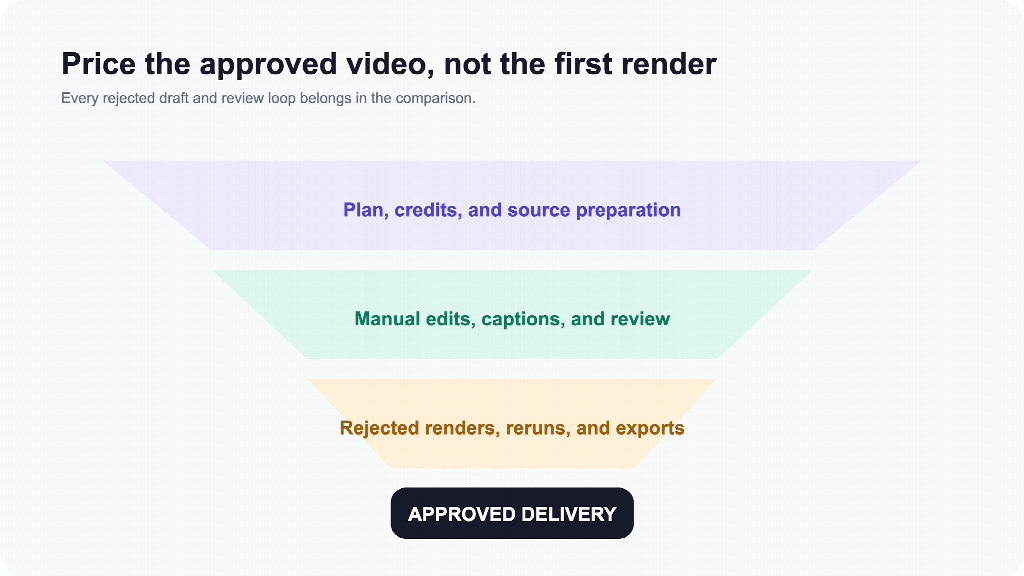
Figure: The useful cost comparison includes human review and revision work, not just the subscription or first render.
A faster first draft can still produce a slower approval if reviewers cannot trace it back to the source. A more automated system can still be expensive if every small change regenerates the entire video. A tool with a higher plan price can be economical when it protects approved assets and contains revisions.
Use the same staff-rate assumptions for every candidate. The goal is not to create a perfect accounting model. The goal is to expose where labor, uncertainty, and rejected work enter the process.
Turn the Nine Tests Into a Buying Score
Assign a weight to each test before running the pilot. A product marketing team may weight information fidelity, correspondence, and controlled revisions most heavily. An agency may add batch isolation and project history. A training team may emphasize source ingestion, localization, captions, and review permissions.
Score every item from one to five and require a written observation. Avoid an overall score based on mood. “The output looked professional” is not evidence. “The model code remained exact in script, caption, and scene four” is evidence.
Set a hard gate for any non-negotiable requirement. If the product must show an approved UI without redrawing it, no amount of avatar quality can compensate. If every update requires a new timeline, a high automation score may not help a weekly release workflow.
Finally, repeat the pilot with a second normal job. One successful run proves possibility, not reliability. The second run shows whether the process can become routine for the people who will actually operate it.
Frequently Asked Questions
What is the first test for an AI explainer video generator?
Use a frozen source pack with one real asset and five exact facts. Include a model code, price, number with a unit, and approved phrase. Then review asset fidelity, literal information fidelity, and script-to-visual correspondence separately.
How many tools should I include in a pilot?
Two or three serious candidates are usually enough. Use the same brief, source pack, reviewer, and time limit. A long list creates shallow testing and makes the comparison harder to finish.
Should I choose the tool with the best first video?
Not automatically. Run a one-change revision and calculate the time to approved delivery. Commercial workflows include updates, exceptions, and variants. The best first draft can become expensive if every correction restarts the full process.
Can a generator guarantee product accuracy?
No responsible process should promise zero errors. The practical goal is to preserve supplied assets and copy, expose the production plan, detect obvious mismatches, and make corrections with a contained review cycle.
What should an agency test beyond video quality?
Test project separation, naming, version history, repeatability, batch behavior, API or automation options, failure handling, and client review. Also verify current contract terms for data handling, asset use, commercial rights, and service commitments.
How do I compare pricing fairly?
Compare the cost of an approved video. Add plan fees, credits, source preparation, manual cleanup, review, rejected renders, reruns, localization, and exports. Use the same assumptions for every candidate.